

Looking for docs on Bitbucket Cloud? See this doc.
Examples
Sync individual repos
Sync individual repos
Sync all repos in a project
Sync all repos in a project
Sync all repos
Sync all repos
Requires a
token to be set in order to access private repositories.Exclude repos from syncing
Exclude repos from syncing
Authenticating with Bitbucket Data Center
In order to index private repositories, you’ll need to provide a HTTP Access Token. Tokens can be scoped to a user account, a project, or an individual repository. Only repositories visible to the token will be able to be indexed by Sourcebot.If permission syncing is enabled, the token must have Repository Admin permissions so Sourcebot can read repository-level user permissions.
- User account token
- Project / repository token
User account tokens grant access to all repositories the user can access. Because these are tied to a specific user account, you must also set the
user field to that user’s username.- In Bitbucket Data Center, navigate to your profile → Manage account → HTTP access tokens and click Create token. Give it a name and grant it Project read and Repository read permissions.
-
Add the
user(your Bitbucket username) andtokenproperties to your connection config:
- Pass this environment variable each time you run Sourcebot:
Rate limiting
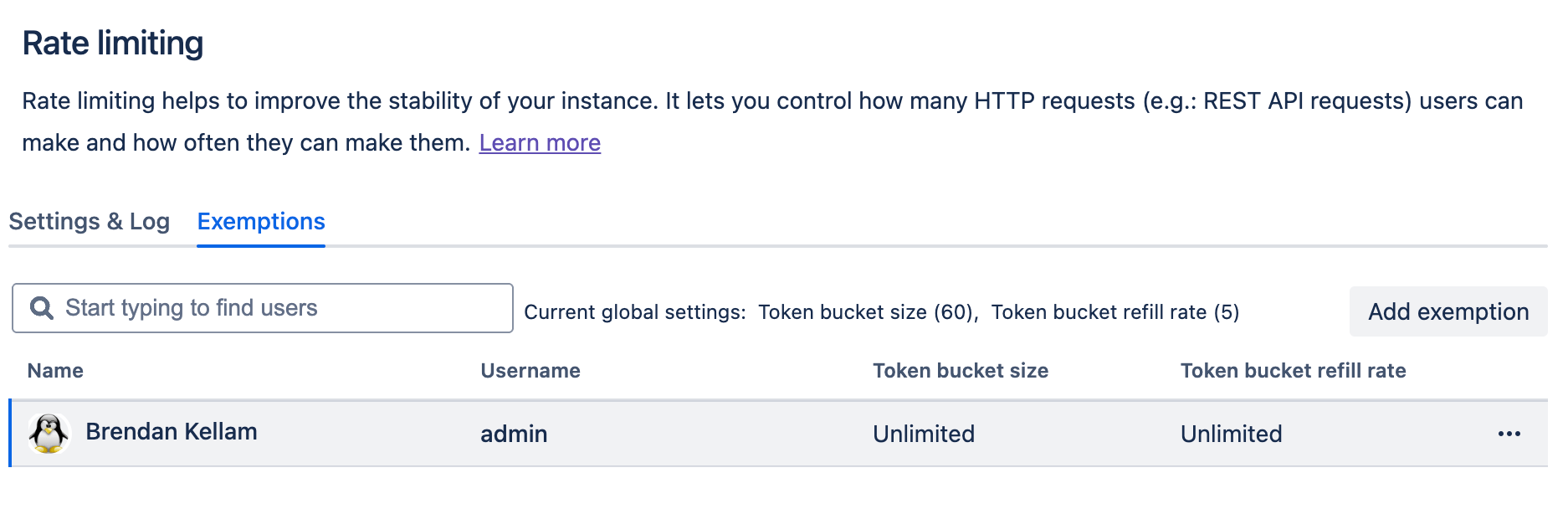
Bitbucket Data Center supports rate limiting to protect instance stability. Rate limiting applies to HTTP requests with basic or bearer authentication, which includes the REST API calls Sourcebot makes to sync repositories. If rate limiting is enabled on your instance, Sourcebot may receiveHTTP 429 (Too Many Requests) errors during sync. To prevent this, add a rate limiting exemption for the user (service account) whose token is used in your connection config.
To add an exemption:
- In Bitbucket Data Center, go to Administration → Rate limiting → Exemptions tab.
- Click Add exemption and find the service account user.
- Select Allow unlimited requests (recommended) or set a custom token bucket size and refill rate appropriate for your sync volume.
- Click Save.
Troubleshooting
If you’re seeing errors likeTypeError: fetch failed when fetching repo info, it may be that Sourcebot is refusing to connect to your self-hosted Bitbucket instance due to unrecognized SSL certs. Try setting the NODE_TLS_REJECT_UNAUTHORIZED=0 environment variable or providing Sourcebot your certs through the NODE_EXTRA_CA_CERTS environment variable.
Schema reference
Reference
Reference